Rocky linux에 k8s(v1.34.2) 손설치 8 최종 동작 테스트
- ETCD 암호화 테스트
1
2
3
4
5
6
7
8
9
10
kubectl create secret generic kubernetes-the-hard-way --from-literal="mykey=mydata"

# 확인
kubectl get secret kubernetes-the-hard-way
kubectl get secret kubernetes-the-hard-way -o yaml
kubectl get secret kubernetes-the-hard-way -o jsonpath='{.data.mykey}' ; echo
kubectl get secret kubernetes-the-hard-way -o jsonpath='{.data.mykey}' | base64 -d ; echo

ssh root@server \
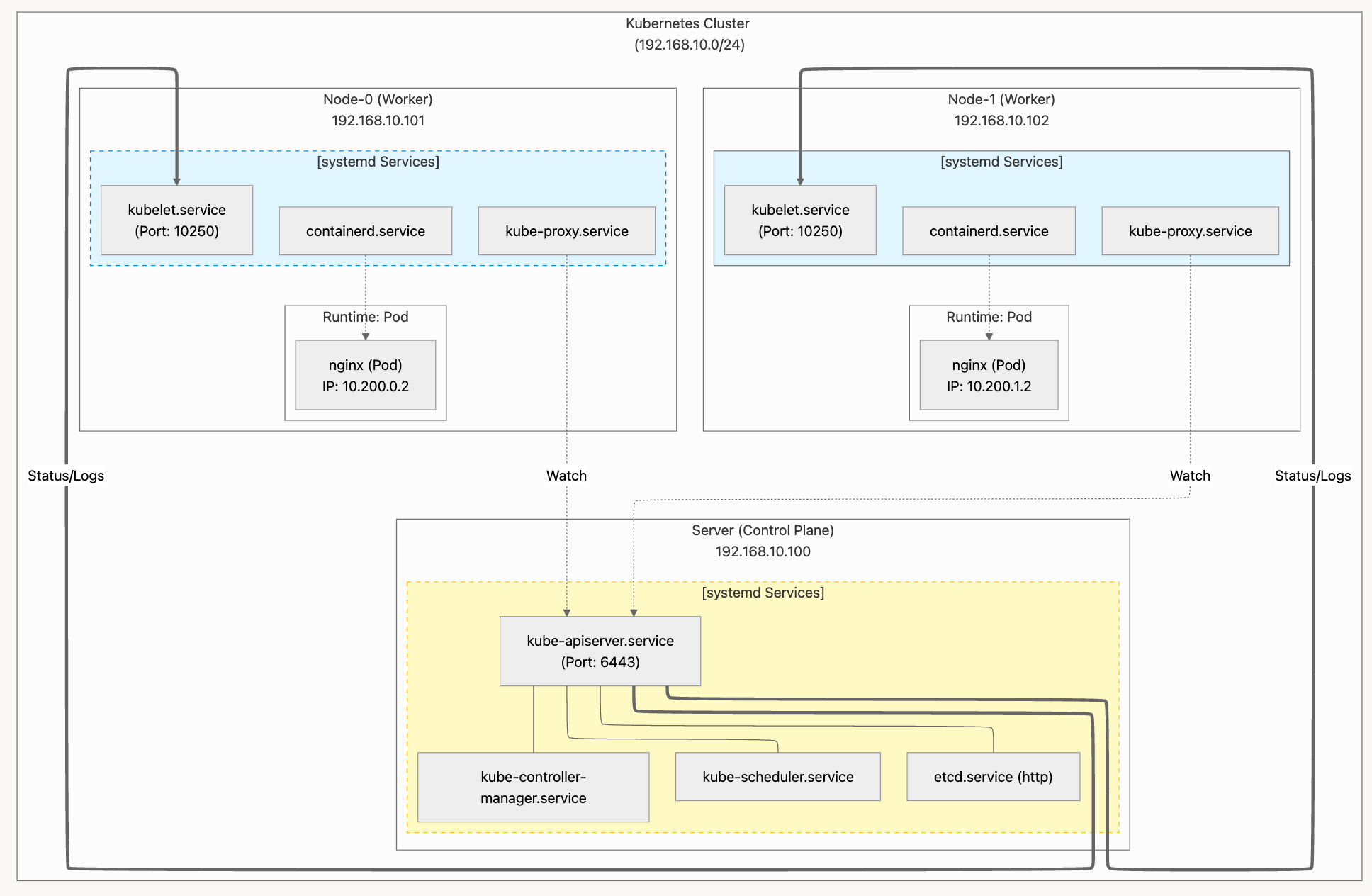
    'etcdctl get /registry/secrets/default/kubernetes-the-hard-way | hexdump -C'
- Kubernetes Secret이 etcd에 AES-CBC 방식으로 정상 암호화되어 저장되고 있음을 증명하는 출력
- k8s:enc : Kubernetes 암호화 포맷
- aescbc : 암호화 알고리즘 (AES-CBC)
- v1 : encryption provider 버전
- key1 : 사용된 encryption key 이름
- 이후 데이터는 암호화된 데이터
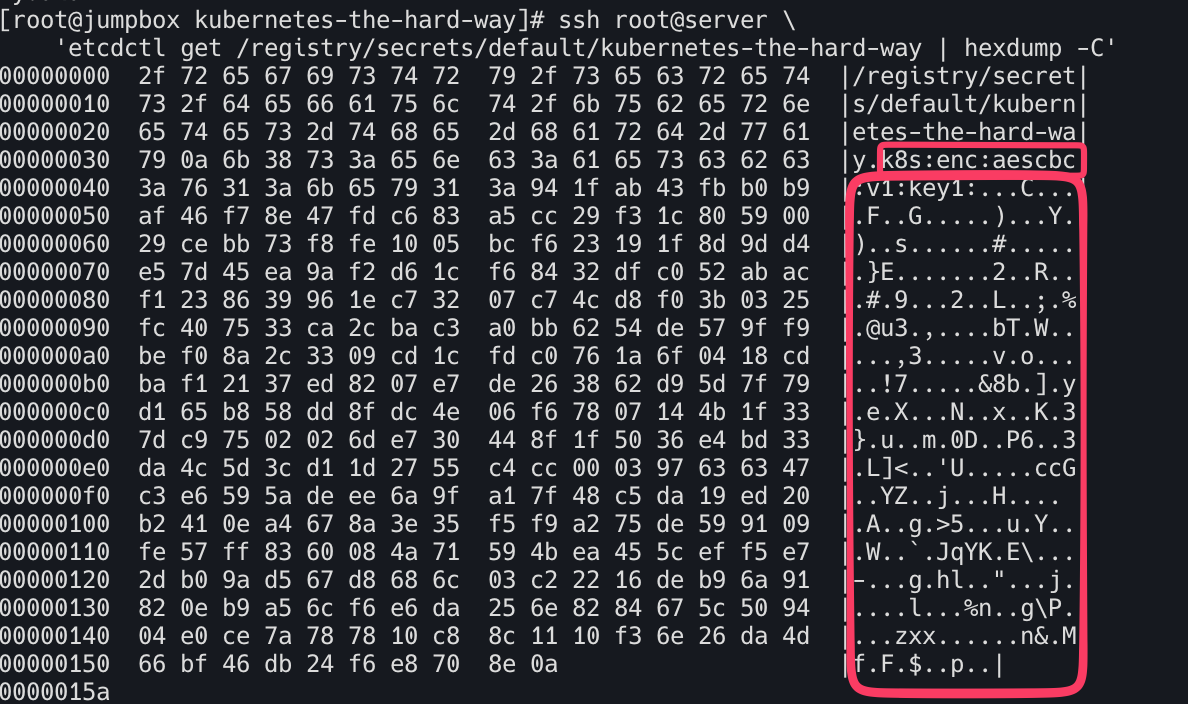
- Deployments, Port Forwarding, Log, Service(NodePort) 확인
1
2
3
4
kubectl get pod
kubectl create deployment nginx --image=nginx:latest
kubectl scale deployment nginx --replicas=2
kubectl get pod -owide

1
2
3
4
5
6
7
8
9
10
11
12
13
14
15
16
17
18
19
20
21
22
23
24
25
26
27
28
29
30
31
32
33
34
35
36
37
38
39
40
41
42
43
44
45
46
47
48
49
50
51
52
53
54
55
56
57
58
59
60
61
62
63
ssh node-0 crictl ps
ssh node-1 crictl ps
ssh node-0 pstree -ap
ssh node-1 pstree -ap
ssh node-0 brctl show
ssh node-1 brctl show
ssh node-0 ip addr # 파드 별 veth 인터페이스 생성 확인
ssh node-1 ip addr # 파드 별 veth 인터페이스 생성 확인


# server 노드에서 파드 IP로 호출 확인
ssh server curl -s 10.200.1.2 | grep title
ssh server curl -s 10.200.0.2 | grep title


# Port Forwarding
# Retrieve the full name of the nginx pod:
POD_NAME=$(kubectl get pods -l app=nginx -o jsonpath="{.items[0].metadata.name}")
echo $POD_NAME

# Forward port 8080 on your local machine to port 80 of the nginx pod:
kubectl port-forward $POD_NAME 8080:80 &
ps -ef | grep kubectl

# In a new terminal make an HTTP request using the forwarding address:
curl --head http://127.0.0.1:8080


# Log
# Print the nginx pod logs
kubectl logs $POD_NAME
curl --head http://127.0.0.1:8080
kubectl logs $POD_NAME

# 확인 후 port-forward Killed
kill -9 $(pgrep kubectl)


# Exec
# Print the nginx version by executing the nginx -v command in the nginx container:
kubectl exec -ti $POD_NAME -- nginx -v


# Service
# Expose the nginx deployment using a NodePort service:
cur

# 확인
kubectl get service,ep nginx
NAME            TYPE       CLUSTER-IP    EXTERNAL-IP   PORT(S)        AGE
service/nginx   NodePort   10.32.0.149   <none>        80:31410/TCP   10s

NAME              ENDPOINTS                     AGE
endpoints/nginx   10.200.0.2:80,10.200.1.2:80   10s

# Retrieve the node port assigned to the nginx service:
NODE_PORT=$(kubectl get svc nginx --output=jsonpath='{range .spec.ports[0]}{.nodePort}')
echo $NODE_PORT

# Make an HTTP request using the IP address and the nginx node port:
curl -s -I http://node-0:${NODE_PORT}
curl -s -I http://node-1:${NODE_PORT}
이 기사는 저작권자의 CC BY 4.0 라이센스를 따릅니다.