[K8S Deploy Study by Gasida] - Ansible 기초 - Facts
[K8S Deploy Study by Gasida] - Ansible 기초 - Facts
Tags
태그를 사용하여 선택한 작업을 실행하거나 건너뛰게 설정
- 플레이북이 큰 경우 전체 플레이북을 실행하는 대신 특정 부분만 실행하는 것이 유용할때
- Ansible 태그를 사용하면 건너뛰기, 실행 둘 중하
tags키워드는 플레이북의 ‘사전 처리 pre processing’ 단계에 포함되며, 실행 가능한 작업을 결정할 때 높은 우선순위를 갖음
개별 작업에 태그추가
가장 기본적인 수준에서 개별 작업에 하나 이상의 태그를 적용할 수 있다.
- playbooks, task files 또는 Role 내의 작업에 태그 추가
- 핸들러는 알림을 받았을 때만 실행되는 특수한 작업 유형으로 모든 태그를 무시하며 선택 대상이 될 수 없다.
예)
1
2
3
4
5
6
7
8
9
10
11
12
13
14
15
16
17
tasks:
- name: Install the servers
  ansible.builtin.yum:
    name:
    - httpd
    - memcached
    state: present
  tags:
  - packages
  - webservers

- name: Configure the service
  ansible.builtin.template:
    src: templates/src.j2
    dest: /etc/foo.conf
  tags:
  - configuration
블록(blocks)에 태그추가
- 일부 작업에만 태그를 적용하려면 블록을 사용 하고 블록 수준에서 태그를 정의한다.
tag선택 사항이block오류 처리를 포함한 다른 대부분의 논리보다 우선한다는 점에 유의
예)
1
2
3
4
5
6
7
8
9
10
11
12
13
14
15
16
17
18
19
20
21
22
23
24
25
26
27
28
- name: ntp tasks
  tags: ntp
  block:
  - name: Install ntp
    ansible.builtin.yum:
      name: ntp
      state: present

  - name: Configure ntp
    ansible.builtin.template:
      src: ntp.conf.j2
      dest: /etc/ntp.conf
    notify:
    - restart ntpd

  - name: Enable and run ntpd
    ansible.builtin.service:
      name: ntpd
      state: started
      enabled: true

- name: Install NFS utils
  ansible.builtin.yum:
    name:
    - nfs-utils
    - nfs-util-lib
    state: present
  tags: filesharing
block의 작업에 태그를 설정하지만rescue섹션이나always섹션에 태그를 설정하지 않으면 해당 섹션의 작업을 포함하지 않는 태그가 트리거되는 것을 방지할 수 있다.- 지정 없이 호출하면 3개의 작업을 모두 실행하지만,
--tags example을 지정하여 실행하면 첫 번째 작업만 실행한다.
1
2
3
4
5
6
7
8
9
10
- block:
  - debug: msg=run with tag, but always fail
    failed_when: true
    tags: example

  rescue:
  - debug: msg=I always run because the block always fails, except if you select to only run 'example' tag

  always:
  - debug: msg=I always run, except if you select to only run 'example' tag
plays 에 태그 추가
- 플레이에 포함된 모든 작업에 동일한 태그를 지정해야 하는 경우, 플레이 수준에서 태그를 추가할 수 있다.
- NTP 작업만 포함된 플레이가 있다면 전체 플레이에 태그를 지정할수 있다.
1
2
3
4
5
6
7
8
9
10
11
12
13
14
15
16
17
18
19
20
21
22
23
24
25
26
- hosts: all
  tags: ntp

  tasks:
  - name: Install ntp
    ansible.builtin.yum:
      name: ntp
      state: present

  - name: Configure ntp
    ansible.builtin.template:
      src: ntp.conf.j2
      dest: /etc/ntp.conf
    notify:
    - restart ntpd

  - name: Enable and run ntpd
    ansible.builtin.service:
      name: ntpd
      state: started
      enabled: true

- hosts: fileservers
  tags: filesharing
  tasks:
  # ...
roles에 태그 추가 방법
- 역할 수준에서 태그를 추가
import_role에 태그를 설정하여 역할의 모든 작업에 동일한 태그 또는 태그를 추가
1
2
3
4
5
6
7
8
9
10
11
12
13
14
15
16
17
18
19
20
21
22
23
24
25
26
27
28
29
30
31
roles:
  - role: webserver
    vars:
      port: 5000
    tags: [ web, foo ]

or:
---
- hosts: webservers
  roles:
    - role: foo
      tags:
        - bar
        - baz
    # using YAML shorthand, this is equivalent to:
    # - { role: foo, tags: ["bar", "baz"] }

or:
---
- hosts: webservers
  tasks:
    - name: Import the foo role
      import_role:
        name: foo
      tags:
        - bar
        - baz

    - name: Import tasks from foo.yml
      import_tasks: foo.yml
      tags: [ web, foo ]
includes에 태그 추가
- dynamic includes 항목에 태그를 적용할 수 있다.
- 개별 작업의 태그와 마찬가지로,
include_*작업의 태그는 include 항목 자체에만 적용되며 포함된 파일이나 역할 내의 작업에는 적용되지 않는다. - dynamic includes 항목에 내 태그를 추가한 다음
--tags mytags로 해당 플레이북을 실행하면 Ansible은 include 항목 자체를 실행하고, 포함된 파일이나 역할 내의 모든 작업을 내 태그로 지정한 후, 해당 태그 없이 포함된 파일이나 역할 내의 모든 작업을 건너뛸 수 있다.
1
2
3
4
5
6
---
# file: roles/common/tasks/main.yml

- name: Dynamic reuse of database tasks
  include_tasks: db.yml
  tags: db
Tags 실습
1
project/tags1.yml
1
2
3
4
5
6
7
8
9
10
11
12
13
14
15
16
17
18
---
- hosts: web
  tasks:
    - name: Install the servers
      ansible.builtin.apt:
       name:
         - htop
       state: present
      tags:
        - packages

    - name: Restart the service
      ansible.builtin.service:
        name: rsyslog
        state: restarted
      tags:
        - service
--list-tags : 사용 가능한 태그 목록 생성 --list-tasks : --tags tagname 또는 --skip-tags tagname과 함께 사용할 경우 태그가 지정된 작업의 미리보기를 생성
1
ansible-playbook tags1.yml --list-tags
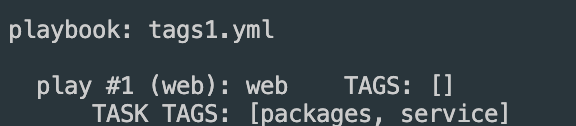
packages태그가 붙어있는 task를 확인
1
ansible-playbook tags1.yml --tags "packages" --list-tasks
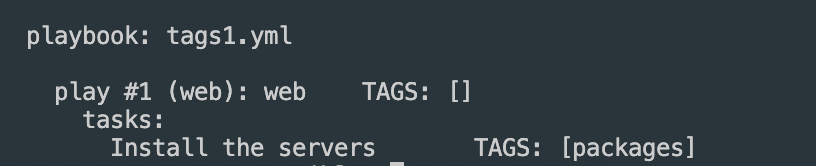
packages 태그가 포함된 task만 실행 확인
1
ansible-playbook tags1.yml --tags "packages"
packages 태그가 포함된 task만 스킵하고 나머지 실행 (--skip-tags)
1
ansible-playbook tags1.yml --skip-tags "packages"
태그가 하나 이상 있는 작업실행 (-tags tagged)
1
ansible-playbook tags1.yml --tags tagged
태그 우선순위
건너뛰기(–skip-tags)는 항상 명시적인 태그보다 우선한다.
- -tags와 –skip-tags를 모두 지정하면 후자가 우선
- –tags tag1, tag3, tag4 –skip-tags tag3는 tag1 또는 tag4로 태그된 작업만 실행하지만, 작업에 다른 작업 중 하나가 있더라도 tag3에서는 실행되지 않는다.
이 기사는 저작권자의 CC BY 4.0 라이센스를 따릅니다.